
Key takeaways
- Duplicate customer profiles split loyalty points, fragment purchase history, and skew dispensary reporting.
- Duplicate Member Avoidance prevents new duplicates by checking against existing member records when a license is scanned at check-in and when online orders are accepted.
- Duplicate Member Merge cleans up duplicates that already exist, including those from imports or that slipped through.
- Merging moves loyalty points onto one main profile by default. Nothing is deleted, and every order stays linked.
- Your team approves every merge, and merges can be undone.
Your best customer might be two people in your system. Maybe three.
It happens to every dispensary. A shopper signs up at the counter with their phone number, then creates an online account with their email. A budtender adds a new profile during a Saturday rush instead of searching for the existing one. A customer changes phone numbers and starts fresh. Each time, a new member record is born, and your view of that customer splits in two.
Today, we're launching Duplicate Member Merge in BLAZE Retail to fix that. Member Merge consolidates duplicate customer accounts into a single profile, preserving past transaction records, loyalty balances, and online access.
What is Duplicate Member Merge?
Duplicate Member Merge is a BLAZE Retail feature that combines two or more profiles belonging to the same customer into one unified member record. Nothing is deleted: loyalty points move onto the main profile by default, and each duplicate's purchase history stays linked to it.
- Phone
- (213) 555-0148
- —
- Points
- 380
- Phone
- —
- jreyes@mail.com
- Points
- 215
- Phone
- (213) 555-0199
- Alt. phone
- + (213) 555-0148
- Alt. email
- + jreyes@mail.com
- Points
- 1,240 + 595 = 1,835
The result is one accurate, complete record per customer: the foundation for better service, fairer loyalty, and reporting you can actually trust.
The hidden cost of duplicate customer profiles
Duplicate profiles look like a small data-hygiene issue. In practice, they create real problems on both sides of the counter.
Fragmented purchase histories
When a customer's transactions are spread across multiple profiles, no single record tells the full story. Budtenders can't see what someone bought last month. Marketing can't segment accurately. Your most loyal shoppers can look like occasional visitors.
Split loyalty points
This is the one customers notice. They know they've been shopping with you for a year, but their points balance says otherwise because half their rewards are sitting in a second account. That's a frustrating moment at checkout and a fast way to erode trust in your loyalty program.
Login errors on your e-commerce storefront
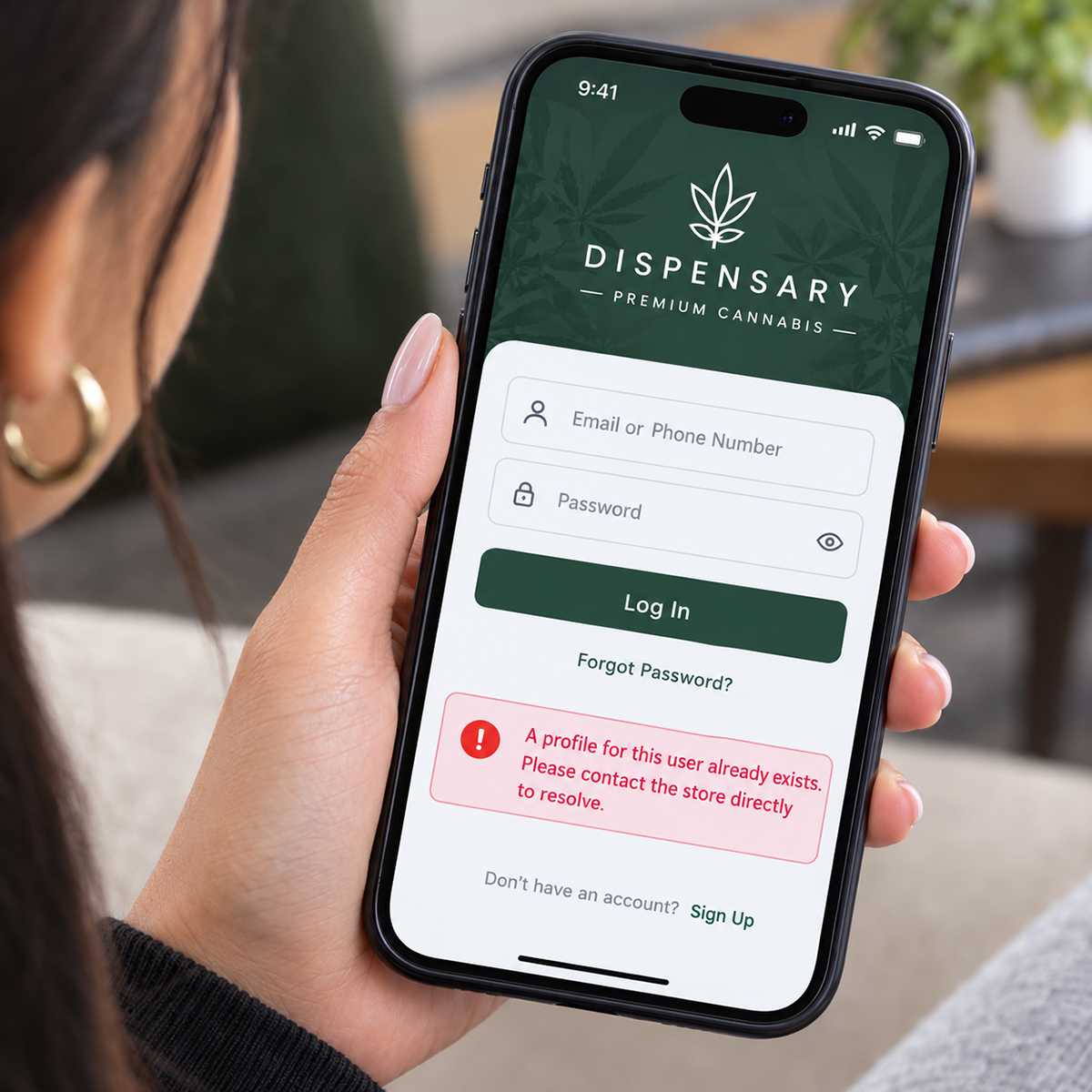
Duplicates often collide online. A customer tries to sign in or create an account and hits an error because their email or phone number is already tied to another profile. Every failed login is a potential abandoned cart.
Skewed reporting
Duplicate members inflate your customer count and deflate metrics like visit frequency, average lifetime value, and retention. Decisions built on those numbers start from the wrong place.
How Member Merge helps
Member Merge was built to solve each of those problems directly.
Eliminates duplicate accounts effortlessly
Search for duplicates you already know, or let a merge run scan every member across your shops. Merge them into a single profile without re-keying customer details or cleaning up spreadsheets.
Consolidates loyalty rewards
By default, loyalty points from every duplicate profile move onto the main account. Customers get full credit for every dollar they've spent, and your team stops fielding “where did my points go?” questions.
Preserves transaction history
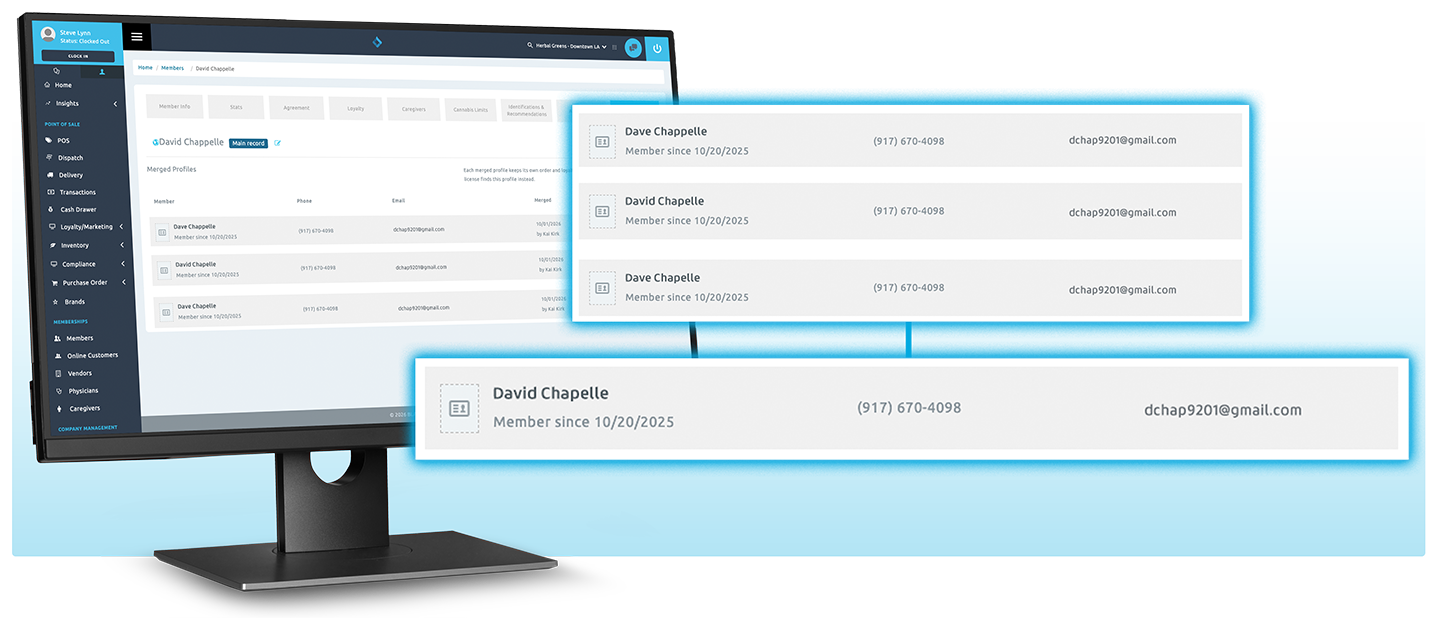
Nothing is deleted. Each duplicate becomes a secondary record that keeps its own order history, linked to the main profile and one click away from its Merged Profiles tab.
Prevents checkout friction online
By resolving duplicate accounts, Member Merge removes the conflicts that cause login errors on your online store. Customers sign in, see their history and rewards, and check out.
Unifies data across touchpoints
In-store purchases, online orders, and loyalty activity finally point to the same person, powering more personal service at the counter and more relevant outreach everywhere else.
Protects your reporting
With one profile per customer, your reports reflect reality. Customer counts, visit frequency, lifetime value, and retention become metrics you can plan around.
Prevent duplicates with Duplicate Member Avoidance
The easiest duplicate to fix is the one that never gets created. Duplicate Member Avoidance actively checks against existing member records when a license is scanned at check-in and when an online order is accepted, so returning customers are matched to the profile they already have instead of getting a new one.
Duplicate Member Avoidance
Checks existing member records when a license is scanned at check-in or an online order is accepted, catching duplicates before they pile up.
Best for everyday check-ins and online ordersDuplicate Member Merge
Combines existing duplicates into one main profile, with points moved over and every order kept.
Best for imports, legacy data, and records that slipped throughAvoidance handles the everyday flow at the counter and online. Member Merge handles everything else: duplicates brought in through member imports, legacy data, and the occasional record that slips through. Together, they keep your customer base clean going forward and fix what's already there.
Learn how to turn on Duplicate Member Avoidance →
How Member Merge works
Member Merge lives under Tools in BLAZE Retail and gives you two ways to clean up.
Merge customers you already know
Search by name, phone, email, license or rec number. Add each profile to a group, review them side by side, pick the main profile, and confirm. The merge happens right away.
Clean up your whole company
BLAZE scans every member across your shops, grouping profiles that share a license, rec number, email or phone. Names, birthdates and addresses never form a group on their own, since too many people share them. Review each group, confirm the real duplicates or mark them “Not a duplicate,” then merge everything you confirmed in one step.
Either way, a person makes every decision. Member Merge never merges on its own, and you choose which phones, emails and IDs are copied onto the main profile. Every merge is recorded on the Runs tab, and merges can be undone.
Read the getting started guide →
Why unified customer data matters for dispensaries
Cannabis retail runs on relationships. Regulars expect budtenders to remember their preferences, loyalty programs to reward their spend, and online ordering to just work. All of that depends on a clean, complete customer record.
Unified data also matters for growth. Personalized promotions, win-back campaigns, and VIP tiers are only as smart as the profiles behind them. If one customer appears as two, they might get the wrong offer, miss a tier they've earned, or receive duplicate messages. Clean data makes every marketing dollar work harder.
And as your business scales across more locations and channels, the risk of duplicates grows with it. Having a simple way to merge records keeps your customer base clean as you expand.
Best practices for keeping customer data clean
Member Merge makes cleanup easy, and a few habits help keep duplicates from piling up in the first place:
- Search before you create. Train budtenders to look up customers by phone, email, or name before adding a new profile.
- Merge before major promotions. Clean up duplicates ahead of loyalty events or holiday campaigns so every customer sees their true points balance.
- Watch for common signals. Matching names with different contact details, or customer reports of missing points, are often signs of a duplicate.
- Make it routine. A regular data-hygiene check keeps reporting accurate month over month.
Frequently asked questions
What happens to a customer's loyalty points when profiles are merged?
By default, each duplicate's points balance moves onto the main profile. You can choose to keep balances separate for any group.
Will we lose any transaction history?
No. Nothing is deleted. Each merged profile stays in BLAZE with its own order history, linked to the main profile.
Does Member Merge merge profiles automatically?
No. It finds possible duplicates, but your team confirms every merge. Merges can also be undone.
Who can use Member Merge?
Duplicate Member Merge is available now to BLAZE Retail customers, under Tools in BLAZE Retail.
What is Duplicate Member Avoidance?
Duplicate Member Avoidance prevents new duplicates by actively checking against existing member records when a license is scanned at check-in or an online order is accepted, so returning customers are matched to their existing profile.
What's the difference between Duplicate Member Avoidance and Duplicate Member Merge?
Avoidance stops duplicates as they come in, at check-in and online. Merge combines duplicates that already exist, such as those from member imports or older records.
How does Member Merge find duplicates?
You can search for profiles you already know are duplicates, or start a merge run that scans every member across your shops and groups profiles sharing a license, rec number, email or phone.
Can a merge be undone?
Yes. Every merge is recorded on the Runs tab, and merges can be undone.
Duplicate profiles are inevitable. Living with them isn't.
With Duplicate Member Merge, every customer gets one complete profile, with every purchase, every point, and seamless online access intact.